

In Germany, dm and the PAYBACK rewards program work closely together. By linking your accounts and making the most of your points, you can save money on your everyday shopping.
This step-by-step guide shows you exactly how to connect your dm membership card with your PAYBACK account, redeem your points at checkout, or transfer them to your bank account.
Step 1: Create a dm Account
Visit the dm website or download the Mein dm app.
- Tap My Account in the top-right corner.
- Select Register Now.
- Enter your email address, password, name, and address to create your account.
Once your registration is complete, you’ll automatically receive a digital dm membership card.
Step 2: Create a PAYBACK Account
Visit the PAYBACK website or download the PAYBACK app.
- Tap Sign Up Now.
- Enter your personal information.
- After registration, you’ll receive your 10-digit PAYBACK card number.
Tip: Use the same email address for both your dm and PAYBACK accounts. This makes linking them much easier.
Step 3: Download the Mein dm App
Search for Mein dm in the App Store or Google Play.
After installing the app, sign in with your dm account.
Step 4: Link Your PAYBACK Card in the Mein dm App
After signing in:
- Tap My Account in the bottom-right corner.
- Find the PAYBACK section.
- Tap Link my dm account with PAYBACK.
- Enter your 10-digit PAYBACK card number and confirm.
Your dm and PAYBACK accounts are now successfully linked.
Step 5: Use Your dm Membership Card and PAYBACK Coupons
When shopping at dm:
- First, show the QR code of your dm membership card in the Mein dm app.
- Then scan your PAYBACK coupon QR code from the PAYBACK app.
At a self-checkout, scan your dm membership card first, followed by your PAYBACK coupon.
Important: To earn the maximum number of points, both QR codes must be scanned.
How to Redeem PAYBACK Points (Including the Security PIN)
Once you’ve collected at least 200 PAYBACK points (worth €2), you can redeem them at participating stores such as dm, REWE, and Penny.
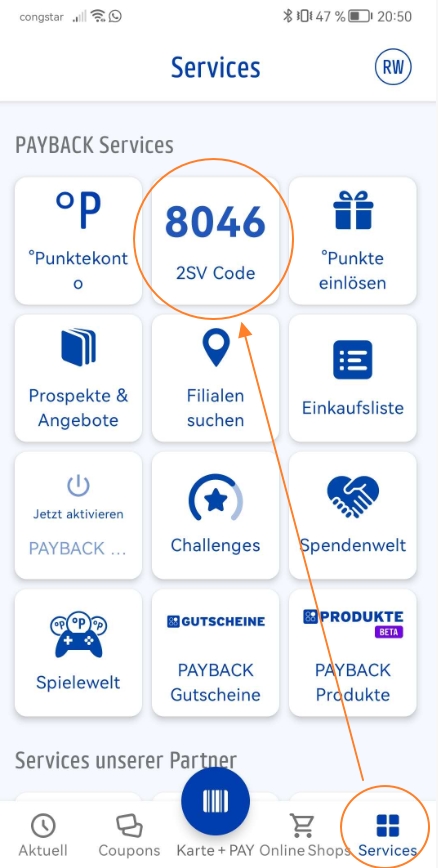
For security reasons, you’ll now need to generate a temporary PIN before redeeming your points.
Redeeming PAYBACK Points at dm
- Open the PAYBACK app.
- Tap Redeem Points from the bottom menu.
- Select dm (or another participating retailer).
- Tap Redeem.
- Generate your temporary authorization PIN. It is only valid for a few minutes.
- Tell the cashier you’d like to redeem your PAYBACK points.
- Show your PAYBACK card or the barcode in the app.
- Enter the PIN on the payment terminal when prompted.
- Your points will automatically be deducted from your purchase total.
Redeeming Points at Self-Checkout
- Scan your products.
- Select Redeem PAYBACK Points during checkout.
- Scan your PAYBACK card.
- Generate a temporary PIN in the PAYBACK app.
- Enter the PIN on the terminal.
- Complete your payment.
Important Notes
- A new PIN is required for every redemption.
- The PIN is valid for approximately 5 minutes.
- You cannot redeem PAYBACK points without a valid PIN.
Redeeming Points Online (For Example, at dm.de)
When checking out on participating websites such as dm.de, you may be asked to confirm your redemption or enter a security PIN before your PAYBACK points can be applied.
How to Cash Out Your PAYBACK Points
If you’d rather receive cash instead of using your points in stores, you can transfer them directly to your bank account.
Please note that this option is only available on the PAYBACK website, not in the app.
Here’s How
- Log in to your PAYBACK account on the PAYBACK website.
- Go to My Points → Cash Out Points.
- Enter your IBAN (bank account number).
- Confirm your request.
Your payment is usually processed within 3–5 business days.
Good to Know
- Minimum cash-out: 200 PAYBACK points (€2)
- Cash-out is not available in the PAYBACK app.
Final Thoughts
Linking your dm membership card with your PAYBACK account only takes a few minutes, but it can help you earn more rewards every time you shop. By scanning both your dm membership card and your PAYBACK coupons, you’ll maximize your points, and you can later choose whether to redeem them in-store or transfer them directly to your bank account.
If you found this guide helpful, feel free to share it with your friends or bookmark it for future reference. Stay tuned for more practical tips on saving money and making everyday life in Germany easier.